Showing posts with label google. Show all posts

What are the differences and relationship between MCP and A2A protocol?


What are the differences and relationship between MCP and A2A protocol?

After MCP (Model Context Protocol) from Anthropic getting popularity, recently Google has introduced another protocol - A2A (Agent to Agent Protocol). A natural question arises is how are they related to each other? Are they complementing or competing with each other?

In this post, let’s try to demystify the two protocols.

Current AI Agentic System (or Multi-agent System) development has two challenges:

  • Integrating agent with tools and data
  • Agent to agent communications

In a nutshell, MCP (Model Context Protocol) tackles the first challenge, and A2A (Agent to Agent Protocol) aims to tackle the second one.

MCP

MCP (Model Context Protocol) from Anthropic is an open protocol that standardizes how applications provide context to LLMs, like USB-C port for AI applications.

Just as USB-C provides a standardized way to connect your devices to various peripherals and accessories, MCP provides a standardized way to connect AI models to different data sources and tools. - MCP documentation

According to HuggingFace, an agent has an LLM as its brain and capabilities and tools as its body.

  • Tools available to an agent allow it to access new knowledge beyond the knowledge cut-off date, such as retrieving social media data or the current weather.
  • Capabilities represent everything the agent is equipped to do. One popular capability example is using a memory component to remember things, such as previous conversations and external data.

Look into the example provided by Anthropic, an agent (MCP host) can access additional context from local data sources or remote services via MCP protocol.
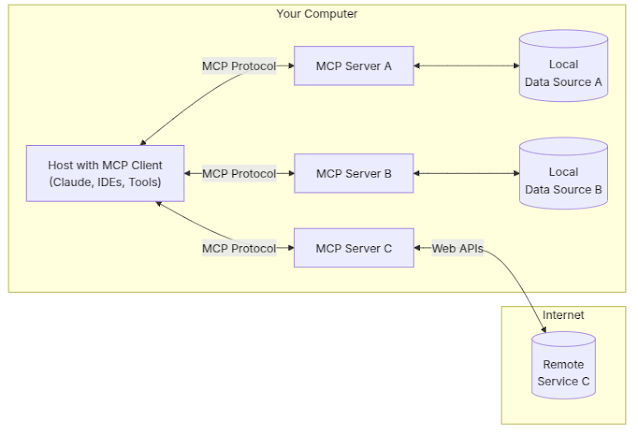


  • MCP Hosts: Programs like Claude Desktop, IDEs, or AI tools that want to access data through MCP
  • MCP Clients: Protocol clients that maintain 1:1 connections with servers
  • MCP Servers: Lightweight programs that each expose specific capabilities through the standardized Model Context Protocol
  • Local Data Sources: Your computer’s files, databases, and services that MCP servers can securely access
  • Remote Services: External systems available over the internet (e.g., through APIs) that MCP servers can connect to

The MCP Server is a foundational component which provides tools, resources, and capabilities to clients via APIs and endpoints. More specifically:

  • Exposing tools that clients can discover and execute
  • Managing resources with URI-based access patterns
  • Providing prompt templates and handling prompt requests
  • Supporting capability negotiation with clients
  • Implementing server-side protocol operations
  • Managing concurrent client connections
  • Providing structured logging and notifications

A2A

A2A (Agent to Agent Protocol) from Google is an open protocol that provides a standard way for agents to collaborate with each other, regardless of the underlying framework or vendor.

A2A facilitates communication between a "client" agent and a “remote” agent.

A client agent is responsible for formulating and communicating tasks, while the remote agent is responsible for acting on those tasks in an attempt to provide the correct information or take the correct action.

This interaction involves several key capabilities:

  • Capability discovery: Agents can advertise their capabilities using an “Agent Card” in JSON format, allowing the client agent to identify the best agent that can perform a task and leverage A2A to communicate with the remote agent.
  • Task management: The communication between a client and remote agent is oriented towards task completion, in which agents work to fulfill end-user requests. This “task” object is defined by the protocol and has a lifecycle. It can be completed immediately or, for long-running tasks, each of the agents can communicate to stay in sync with each other on the latest status of completing a task. The output of a task is known as an “artifact.”
  • Collaboration: Agents can send each other messages to communicate context, replies, artifacts, or user instructions.
  • User experience negotiation: Each message includes “parts,” which is a fully formed piece of content, like a generated image. Each part has a specified content type, allowing client and remote agents to negotiate the correct format needed and explicitly include negotiations of the user’s UI capabilities–e.g., iframes, video, web forms, and more.

Google highlighted A2A is a complementary to MCP rather than an alternative.

Model Context Protocol (MCP) is the emerging standard for connecting LLMs with data, resources, and tools. We already observe MCP standardizing ‘function calling’ across different models and frameworks. This is creating an ecosystem of tool service providers and dramatically lowering the complexity to connect agents with tools and data. We expect this trend to continue as more frameworks, service providers, and platforms adopt MCP.
A2A is focused on a different problem. A2A is an application level protocol that enables agents to collaborate in their natural modalities. It allows agents to communicate as agents (or as users) instead of as tools. We hope that A2A gains adoption as a complement to MCP that enables ecosystems of agents and will be working in the open with the community to make this happen.

Simply put, MCP for tools and A2A for agents.

Google even recommends that applications model A2A agents as MCP resources (represented by their AgentCard). The frameworks can then use A2A to communicate with their user, the remote agents, and other agents as illustrated below.


Discussion

With a peaceful coexisting scenario of the two standards, each agent (MCP host) can have their own connected MCP servers for accessing tools and resources via the MCP protocol. Additionally, these agents communicate with each other through the A2A protocol, as discussed in SwirlAI’s post. This applies when we treat agents as agents as independent entities rather than tools. However, this might change when agents are treated as special tools that can also be exposed via MCP servers.

It will be interesting to see how developers decided choose to adopt these standards - wheter one or both - as their decisions will eventually shape the future of these protocols. Also, MCP and A2A are both new and will keep evolving, with the possibility to extend functionalities to be better positioned in Agentic AI ecosystem.

References

How to mount my Google Drive in Colab?


What is Colab? Colab Notebooks?


Colaboratory is a Google research project created to help disseminate machine learning education and research. It's a Jupyter notebook environment that requires no setup to use and runs entirely in the cloud. 

How long can I use it continuously?
Google Colab notebooks have an idle timeout of 90 minutes and absolute timeout of 12 hours. This means, if user does not interact with his Google Colab notebook for more than 90 minutes, its instance is automatically terminated.


The following example shows how to mount your Google Drive to Colab and run your Python code.

from google.colab import drive

# mount your Google Drive
drive.mount("/content/gdrive") 

# set your root path for the project
root_path = "gdrive/My Drive/app/"

# load and plot dataset
def parser(x):
  return datetime.strptime("190"+x, "%Y-%m")

series = read_csv(root_path+"/data/shampoo.csv", 
                  header=0, 
                  parse_dates=[0], 
                  index_col=0,
                  squeeze=True,
                  date_parser=parser)

# summarize the first few rows
print(series.head())
series.plot()
plt.show()


Can I use GPU?
As of October 13, 2018, Google Colab provides a single 12GB NVIDIA Tesla K80 GPU that can be used up to 12 hours continuously. Recently, Colab also started offering free TPU. You can set up your hardware by selecting the menu:

$ Runtime => Change Runtime Type => Change "Hardware accelerator" to GPU or TPU


Other useful tips 
  • Remeber to save the notebook regularly (Ctrl + s)
  • Use Markdown language (e.g., ## and ###) can generate the Table of Contents automatically
  • You can check the resource (i.e., RAM, Disk) usage and session information in Manage Sessions, and even Terminate your session 


10 Things to be a great boss by Google's research from the last decade


There is quite popular message that "People leave managers, not companies". As managers are so important for a company, the tech giant Google also spent a decade to come up with 10 things or characteristics of becoming a great boss as follows:


  1. Is a good coach
  2. Empowers team and does not micromanage
  3. Creates an inclusive team environment, showing concern for success and well-being
  4. Is productive and results-oriented
  5. Is a good communicator--listens and shares information
  6. Supports career development and discusses performance
  7. Has a clear vision/strategy for the team
  8. Has key technical skills to help advise the team
  9. Collaborates across [the company]
  10. Is a strong decision maker

how to wget from google drive

wget --load-cookies /tmp/cookies.txt "https://docs.google.com/uc?export=download&confirm=$(wget --quiet --save-cookies /tmp/cookies.txt --keep-session-cookies --no-check-certificate 'https://docs.google.com/uc?export=download&id=FILEID' -O- | sed -rn 's/.*confirm=([0-9A-Za-z_]+).*/\1\n/p')&id=FILEID" -O FILENAME && rm -rf /tmp/cookies.txt

[source]: https://gist.github.com/iamtekeste/3cdfd0366ebfd2c0d805

Google Social Graph API & OpenSocial

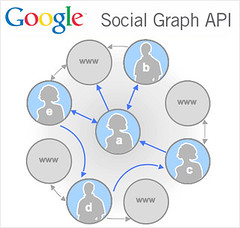
Figure 1
Launched by Google in 2008 and was fully retired in April 20, 2012. The API lets developers locate links that make use of the XFN and FOAF labeling systems. For XFN as an example, if I add the personal or external URL (http://about.me/parklize) in my Twitter profile page (http://twitter.com/parklize) then you will find the rel="me" indication of the link as Fig.2. 
Figure 2
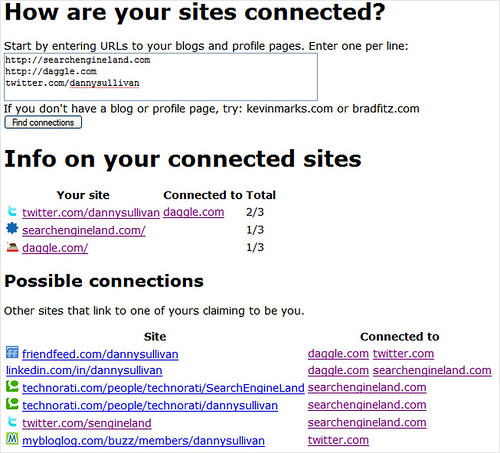
Even though the API is deprecated, the following figure shows how it was working. It can get possible connections based on the URLs added based on the index of XFN and FOAF as mentioned above.


Besides, the OpenSocial, which has an ambiguous name with the Social Graph API led by Google as well is totally different and unrelated to each other. The difference is described in [2] as below:

Though the names are similar, Social Graph API is unrelated to OpenSocial.
  • The Social Graph API was a means to access a crawl we did of XFN and other public graph data.
  • OpenSocial is a standard set of APIs for embedding social gadgets in websites.

They’re both APIs, but APIs to different data, satisfying different use cases.

And recently W3C and the OpenSocial Foundation announced that as of 1 January 2015, OpenSocial standards work and specifications beyond OpenSocial 2.5.1 will take place in the W3C Social Web Working Group, of which the OpenSocial Foundation is a founding member. The W3C Social Web Working Group extends the reach of OpenSocial into the enterprise, HTML5 and Indie Web communities.


GooglePlus API Internal Server Error 500

I use Google+ Java API to get activities of a user and got the error sometimes.

In order to check if it is code problem, checked through API explorer and also has the same problem.

Finally check on the user's profile, the same 500 error occurs while clicking "more" in user's Google+ page.

It seems Google's server problem..

Google Custom Search Engine API - lowRange, highRange, startNum

In line #2, with parameter "highRange":"19800","inputEncoding":"utf8","lowRange":"19700" get total 3 search results with the custom engine.

But in line #50, with parameter "highRange":"19900","inputEncoding":"utf8","lowRange":"19800" get total 0 search results....

And again in line #103, with parameter "highRange":"20000","inputEncoding":"utf8","lowRange":"19900" get total 4840 results...


What is the lowRange and highRange exactly???

highRangestring
  • Specifies the ending value for a search range.
  • Use lowRange and highRange to append an inclusive search range of lowRange...highRange  to the query.
One  of the most relevant answer in Google group is: 

-------------------------------
In my opinion you could get all the results using the lowRange and High Range properties of the query, and putting values higher than 100
I am using the .net interface and it would look like that:

 CustomsearchService svc = new CustomsearchService();
                    svc.Key = apiKey;
                    
                    Google.Apis.Customsearch.v1.CseResource.ListRequest listRequest = svc.Cse.List(query);
                    listRequest.Cx = cx;
                    
                    listRequest.Start = 0; 
                    listRequest.Num = 10; 
                    listRequest.LowRange = "100";
                    listRequest.HighRange = "200";
                    Google.Apis.Customsearch.v1.Data.Search search = listRequest.Fetch();

                    foreach (Google.Apis.Customsearch.v1.Data.Result result in search.Items)
                    {
                        Console.WriteLine("Title: {0}", result.Title);
                        Console.WriteLine("Link: {0}", result.Link);
                    }
----------------------------------------


But it doesn't make sense in this experiments.... or maybe due to the different search engine mirror used in my case...

1:  results searchinfo:{"formattedSearchTime":"0.41","formattedTotalResults":"3","searchTime":0.409284,"totalResults":"3"}  
2:  results getQuery:{request=[{"count":3,"cx":"008378975908491122506:kjiqkuune8u","highRange":"19800","inputEncoding":"utf8","lowRange":"19700","outputEncoding":"utf8","safe":"off","searchTerms":"linkedin.com/in coursera","siteSearch":"http://www.linkedin.com/in/","startIndex":1,"title":"Google Custom Search - linkedin.com/in coursera","totalResults":"3"}]}  
3:  result size3  
4:  Nick Hall | <b>LinkedIn</b>  
5:  https://www.linkedin.com/in/cloggin  
6:  -----------------------  
7:  Ben Cairns - MEng | <b>LinkedIn</b>  
8:  www.linkedin.com/in/bencairns  
9:  -----------------------  
10:  Sirron Carrector | <b>LinkedIn</b>  
11:  https://www.linkedin.com/in/sirroncarrector  
12:  -----------------------  
13:  starting from...1  
14:  Dec 01, 2014 3:19:03 PM com.google.api.client.googleapis.services.AbstractGoogleClient <init>  
15:  WARNING: Application name is not set. Call Builder#setApplicationName.  
16:  results searchinfo:{"formattedSearchTime":"0.50","formattedTotalResults":"0","searchTime":0.502496,"totalResults":"0"}  
17:  Dec 01, 2014 3:19:04 PM com.google.api.client.googleapis.services.AbstractGoogleClient <init>  
18:  WARNING: Application name is not set. Call Builder#setApplicationName.  
19:  results getQuery:{request=[{"count":10,"cx":"008378975908491122506:kjiqkuune8u","highRange":"19900","inputEncoding":"utf8","lowRange":"19800","outputEncoding":"utf8","safe":"off","searchTerms":"linkedin.com/in coursera","siteSearch":"http://www.linkedin.com/in/","startIndex":1,"title":"Google Custom Search - linkedin.com/in coursera","totalResults":"0"}]}  
20:  starting from...11  
21:  results searchinfo:{"formattedSearchTime":"0.51","formattedTotalResults":"0","searchTime":0.509313,"totalResults":"0"}  
22:  results getQuery:{request=[{"count":10,"cx":"008378975908491122506:kjiqkuune8u","highRange":"19900","inputEncoding":"utf8","lowRange":"19800","outputEncoding":"utf8","safe":"off","searchTerms":"linkedin.com/in coursera","siteSearch":"http://www.linkedin.com/in/","startIndex":11,"title":"Google Custom Search - linkedin.com/in coursera","totalResults":"0"}]}  
23:  starting from...21  
24:  Dec 01, 2014 3:19:05 PM com.google.api.client.googleapis.services.AbstractGoogleClient <init>  
25:  WARNING: Application name is not set. Call Builder#setApplicationName.  
26:  com.google.api.client.googleapis.json.GoogleJsonResponseException: 500 Internal Server Error  
27:  {  
28:   "code" : 500,  
29:   "errors" : [ {  
30:    "domain" : "global",  
31:    "message" : "Backend Error",  
32:    "reason" : "backendError"  
33:   } ],  
34:   "message" : "Backend Error"  
35:  }  
36:  starting from...31  
37:       at com.google.api.client.googleapis.json.GoogleJsonResponseException.from(GoogleJsonResponseException.java:145)  
38:       at com.google.api.client.googleapis.services.json.AbstractGoogleJsonClientRequest.newExceptionOnError(AbstractGoogleJsonClientRequest.java:113)  
39:       at com.google.api.client.googleapis.services.json.AbstractGoogleJsonClientRequest.newExceptionOnError(AbstractGoogleJsonClientRequest.java:40)  
40:       at com.google.api.client.googleapis.services.AbstractGoogleClientRequest$1.interceptResponse(AbstractGoogleClientRequest.java:312)  
41:       at com.google.api.client.http.HttpRequest.execute(HttpRequest.java:1049)  
42:       at com.google.api.client.googleapis.services.AbstractGoogleClientRequest.executeUnparsed(AbstractGoogleClientRequest.java:410)  
43:       at com.google.api.client.googleapis.services.AbstractGoogleClientRequest.executeUnparsed(AbstractGoogleClientRequest.java:343)  
44:       at com.google.api.client.googleapis.services.AbstractGoogleClientRequest.execute(AbstractGoogleClientRequest.java:460)  
45:       at parklize.blogspot.com.test.GoogleSearchClient.getSearchResult(GoogleSearchClient.java:55)  
46:       at parklize.blogspot.com.test.GoogleSearchClient.main(GoogleSearchClient.java:101)  
47:  Dec 01, 2014 3:19:10 PM com.google.api.client.googleapis.services.AbstractGoogleClient <init>  
48:  WARNING: Application name is not set. Call Builder#setApplicationName.  
49:  results searchinfo:{"formattedSearchTime":"4.87","formattedTotalResults":"0","searchTime":4.868337,"totalResults":"0"}  
50:  results getQuery:{request=[{"count":10,"cx":"008378975908491122506:kjiqkuune8u","highRange":"19900","inputEncoding":"utf8","lowRange":"19800","outputEncoding":"utf8","safe":"off","searchTerms":"linkedin.com/in coursera","siteSearch":"http://www.linkedin.com/in/","startIndex":31,"title":"Google Custom Search - linkedin.com/in coursera","totalResults":"0"}]}  
51:  starting from...41  
52:  Dec 01, 2014 3:19:15 PM com.google.api.client.googleapis.services.AbstractGoogleClient <init>  
53:  WARNING: Application name is not set. Call Builder#setApplicationName.  
54:  results searchinfo:{"formattedSearchTime":"0.65","formattedTotalResults":"0","searchTime":0.645973,"totalResults":"0"}  
55:  Dec 01, 2014 3:19:16 PM com.google.api.client.googleapis.services.AbstractGoogleClient <init>  
56:  WARNING: Application name is not set. Call Builder#setApplicationName.  
57:  results getQuery:{request=[{"count":10,"cx":"008378975908491122506:kjiqkuune8u","highRange":"19900","inputEncoding":"utf8","lowRange":"19800","outputEncoding":"utf8","safe":"off","searchTerms":"linkedin.com/in coursera","siteSearch":"http://www.linkedin.com/in/","startIndex":41,"title":"Google Custom Search - linkedin.com/in coursera","totalResults":"0"}]}  
58:  starting from...51  
59:  results searchinfo:{"formattedSearchTime":"0.70","formattedTotalResults":"0","searchTime":0.704197,"totalResults":"0"}  
60:  Dec 01, 2014 3:19:18 PM com.google.api.client.googleapis.services.AbstractGoogleClient <init>  
61:  WARNING: Application name is not set. Call Builder#setApplicationName.  
62:  results getQuery:{request=[{"count":10,"cx":"008378975908491122506:kjiqkuune8u","highRange":"19900","inputEncoding":"utf8","lowRange":"19800","outputEncoding":"utf8","safe":"off","searchTerms":"linkedin.com/in coursera","siteSearch":"http://www.linkedin.com/in/","startIndex":51,"title":"Google Custom Search - linkedin.com/in coursera","totalResults":"0"}]}  
63:  starting from...61  
64:  com.google.api.client.googleapis.json.GoogleJsonResponseException: 500 Internal Server Error  
65:  {  
66:   "code" : 500,  
67:   "errors" : [ {  
68:    "domain" : "global",  
69:    "message" : "Backend Error",  
70:    "reason" : "backendError"  
71:   } ],  
72:   "message" : "Backend Error"  
73:  }  
74:  starting from...71  
75:       at com.google.api.client.googleapis.json.GoogleJsonResponseException.from(GoogleJsonResponseException.java:145)  
76:       at com.google.api.client.googleapis.services.json.AbstractGoogleJsonClientRequest.newExceptionOnError(AbstractGoogleJsonClientRequest.java:113)  
77:       at com.google.api.client.googleapis.services.json.AbstractGoogleJsonClientRequest.newExceptionOnError(AbstractGoogleJsonClientRequest.java:40)  
78:       at com.google.api.client.googleapis.services.AbstractGoogleClientRequest$1.interceptResponse(AbstractGoogleClientRequest.java:312)  
79:       at com.google.api.client.http.HttpRequest.execute(HttpRequest.java:1049)  
80:       at com.google.api.client.googleapis.services.AbstractGoogleClientRequest.executeUnparsed(AbstractGoogleClientRequest.java:410)  
81:       at com.google.api.client.googleapis.services.AbstractGoogleClientRequest.executeUnparsed(AbstractGoogleClientRequest.java:343)  
82:       at com.google.api.client.googleapis.services.AbstractGoogleClientRequest.execute(AbstractGoogleClientRequest.java:460)  
83:       at parklize.blogspot.com.test.GoogleSearchClient.getSearchResult(GoogleSearchClient.java:55)  
84:       at parklize.blogspot.com.test.GoogleSearchClient.main(GoogleSearchClient.java:101)  
85:  Dec 01, 2014 3:19:23 PM com.google.api.client.googleapis.services.AbstractGoogleClient <init>  
86:  WARNING: Application name is not set. Call Builder#setApplicationName.  
87:  results searchinfo:{"formattedSearchTime":"3.40","formattedTotalResults":"0","searchTime":3.402622,"totalResults":"0"}  
88:  results getQuery:{request=[{"count":10,"cx":"008378975908491122506:kjiqkuune8u","highRange":"19900","inputEncoding":"utf8","lowRange":"19800","outputEncoding":"utf8","safe":"off","searchTerms":"linkedin.com/in coursera","siteSearch":"http://www.linkedin.com/in/","startIndex":71,"title":"Google Custom Search - linkedin.com/in coursera","totalResults":"0"}]}  
89:  starting from...81  
90:  Dec 01, 2014 3:19:27 PM com.google.api.client.googleapis.services.AbstractGoogleClient <init>  
91:  WARNING: Application name is not set. Call Builder#setApplicationName.  
92:  results searchinfo:{"formattedSearchTime":"0.72","formattedTotalResults":"0","searchTime":0.722594,"totalResults":"0"}  
93:  results getQuery:{request=[{"count":10,"cx":"008378975908491122506:kjiqkuune8u","highRange":"19900","inputEncoding":"utf8","lowRange":"19800","outputEncoding":"utf8","safe":"off","searchTerms":"linkedin.com/in coursera","siteSearch":"http://www.linkedin.com/in/","startIndex":81,"title":"Google Custom Search - linkedin.com/in coursera","totalResults":"0"}]}  
94:  starting from...91  
95:  Dec 01, 2014 3:19:28 PM com.google.api.client.googleapis.services.AbstractGoogleClient <init>  
96:  WARNING: Application name is not set. Call Builder#setApplicationName.  
97:  results searchinfo:{"formattedSearchTime":"0.56","formattedTotalResults":"0","searchTime":0.558098,"totalResults":"0"}  
98:  results getQuery:{request=[{"count":10,"cx":"008378975908491122506:kjiqkuune8u","highRange":"19900","inputEncoding":"utf8","lowRange":"19800","outputEncoding":"utf8","safe":"off","searchTerms":"linkedin.com/in coursera","siteSearch":"http://www.linkedin.com/in/","startIndex":91,"title":"Google Custom Search - linkedin.com/in coursera","totalResults":"0"}]}  
99:  starting from...1  
100:  Dec 01, 2014 3:19:28 PM com.google.api.client.googleapis.services.AbstractGoogleClient <init>  
101:  WARNING: Application name is not set. Call Builder#setApplicationName.  
102:  results searchinfo:{"formattedSearchTime":"0.34","formattedTotalResults":"4,840","searchTime":0.336376,"totalResults":"4840"}  
103:  results getQuery:{nextPage=[{"count":10,"cx":"008378975908491122506:kjiqkuune8u","highRange":"20000","inputEncoding":"utf8","lowRange":"19900","outputEncoding":"utf8","safe":"off","searchTerms":"linkedin.com/in coursera","siteSearch":"http://www.linkedin.com/in/","startIndex":11,"title":"Google Custom Search - linkedin.com/in coursera","totalResults":"4840"}], request=[{"count":10,"cx":"008378975908491122506:kjiqkuune8u","highRange":"20000","inputEncoding":"utf8","lowRange":"19900","outputEncoding":"utf8","safe":"off","searchTerms":"linkedin.com/in coursera","siteSearch":"http://www.linkedin.com/in/","startIndex":1,"title":"Google Custom Search - linkedin.com/in coursera","totalResults":"4840"}]}  
104:  result size10  

Some thought from comparing search engines Google vs. Bing

By searching academic papers in two search engines, found totally different user experience. The first one is searching paper in Google, which will provide full paper name automatically before you input full title of the paper.

On the other hand, in bing, there's no suggestion for users at all.


Furthermore, in search result, you could see the citation information provided from Google with structured data "by author name" and "publish year".

Bing's result only provides the links to the paper without further structured information or citation information.
Definitely, Google's search experience is better than Bing considering both have academic papers' index system Google Scholar and Microsoft Academic Search separately. Google Scholar is more and more popular and getting better reputation over MAS even though MAS was better academic index system before, this is because more indexing and user experience are provided by Google Scholar nowadays (Some posts say that MAS is preparing new generation MAS). 

Back to the search experience, is this due to the Knowledge Graph initiated by Google at May 2012 ?? Is this the inclination of Google's better experience over Bing???


For the user's perspective, it is definitely better experience if search result contains more and more result that user seek about. The best case is that user could get all information at once with one search without follow the links to another website to get the information by themselves... For example, we could see the opening hours, contact, ratings and reviews while searching a restaurant with in search result. That means, Google is acting not only search engine but answering user's questions with background Knowledge Graph as well as information extracted from related websites.

Is it awesome, then what's the problem?? 

For the millions of companies who were paying bills for directing users to theirs websites, might be big concern with Google's better experience since it will reduce the clicks and reservation on many websites. Ben Gomes said the final goal is let users get the result they want immediately, no matter it is within Google or other websites. Even though, some vendors could be affected by it. Users now could use Google Map in smartphones with Uber App to call taxi but not provide links to other service provides with the same services like Lyft or Sidecar.

We could check the date of hotels on Google and even book rooms directly. This service is without any doubt is a threat to the service like Priceline or Expedia which is providing online booking service. Google was a gateway to provide tremendous traffics to many companies before, but it will be not simple relationships among Google and these companies anymore...


Reference:

谷歌上市10周年记:搜索结果的进化