Showing posts with label Java. Show all posts

How to check all available Java versions on Linux

In order to check the list of Java versions available on our Linux machine, we can use the following command.


$ sudo update-alternatives --config java


 Selection    Path                                            Priority   Status

------------------------------------------------------------

  0            /usr/lib/jvm/java-17-openjdk-amd64/bin/java      1711      auto mode

  1            /usr/lib/jvm/java-11-openjdk-amd64/bin/java      1111      manual mode

* 2            /usr/lib/jvm/java-17-openjdk-amd64/bin/java      1711      manual mode

  3            /usr/lib/jvm/java-8-openjdk-amd64/jre/bin/java   1081      manual mode


The one with * indicates the current version. We can check the current Java version being used directly as well.


$ java --version

openjdk 17.0.10 2024-01-16
OpenJDK Runtime Environment (build 17.0.10+7-Ubuntu-122.04.1)
OpenJDK 64-Bit Server VM (build 17.0.10+7-Ubuntu-122.04.1, mixed mode, sharing)

How to choose Java JDK/JRE in Ubuntu among different alternatives

Set Java in Ubuntu


$ update-java-alternatives --list

$ sudo update-java-alternatives --set /usr/lib/jvm/java-1.8.0-openjdk-amd64

java.awt.AWTError: Assistive Technology not found: org.GNOME.Accessibility.AtkWrapper

Symptom


java.awt.AWTError: Assistive Technology not found: org.GNOME.Accessibility.AtkWrapper 

Solution

This can be done by editing the accessibility.properties file for OpenJDK:

sudo vim /etc/java-8-openjdk/accessibility.properties
Comment out the following line:
assistive_technologies=org.GNOME.Accessibility.AtkWrapper

Java: Date from unix timestamp

Multiply by 1000, since Java is expecting milliseconds:

java.util.Date time=new java.util.Date((long)timeStamp*1000);

Spring JDBC - select where in ()

    
String sql4 = "select distinct UGCID from UGCListFor480 where UserURI =? and CreateTime < ?";  
    List<String> ugcidList = jdbcTemplate.queryForList(sql4, new Object[]{uri, createTime}, String.class);  
    NamedParameterJdbcTemplate namedParameterJdbcTemplate = new NamedParameterJdbcTemplate(jdbcTemplate);  
    MapSqlParameterSource parameters = new MapSqlParameterSource();  
    parameters.addValue("ugcidList", ugcidList);  
    // get link list  
    List<String> linkResults = namedParameterJdbcTemplate.queryForList(  
      "select ExpandedURL from UGCListFor480URL where ExpandedURL <> 'shouldBeDeleted' "  
       + " and UGCID in (:ugcidList) group by UGCID",   
      parameters, String.class );  

Keep process running after ending the ssh session using "screen"

Simple scenario from askubuntu:
  • ssh into your remote box. Type screen Then start the process you want.
  • Press Ctrl-A then Ctrl-D. This will "detach" your screen session but leave your processes running. You can now log out of the remote box.
  • If you want to come back later, log on again and type screen -r This will "resume" your screen session, and you can see the output of your process. However, if you have multiple screens have been detached before, you might get this below:


  • In this case, just specify the screen you want to re-attach
    • screen -r 174044.pts-3.srvgal107
  • Kill screen session : Press Ctrl-A then K.
  • Access attatched screen : screen -D -r '1234.somescreensession'
  • Scroll inside screen
    • Maybe there's a better way, but I'm used to scrolling using the "copy mode" (which you can use to copy text using screen itself, although that requires the paste command too):
      • Hit your screen prefix combination (C-a / control+A by default), then hit Escape.
      • Move up/down with the arrow keys (↑ and ↓).
      • When you're done, hit Return twice to get back to the end of the scroll buffer.
      (If you move the cursor after hitting Return once, you'll be selecting text to copy, and hitting Return the second time will copy it. Then you can paste with C-a followed by] )
  • Quite a session: screen -X -S [session # you want to kill] quit

Java - Count the number of times a word appears in a string


  • Apache Common StringUtils function

1:       public static int countMatches(String str, String sub) {  
2:         if (isEmpty(str) || isEmpty(sub)) {  
3:           return 0;  
4:         }  
5:         int count = 0;  
6:         int idx = 0;  
7:         while ((idx = str.indexOf(sub, idx)) != -1) {  
8:           count++;  
9:           idx += sub.length();  
10:         }  
11:         return count;  
12:       }  
13:       public static boolean isEmpty(String str) {  
14:     return str == null || str.length() == 0;  
15:    }  

  • Use Regex
1:       public static int countMatchesWithRegex(String str, String reg) {  
2:            Matcher m = Pattern.compile(reg).matcher(str);  
3:            int matches = 0;  
4:            while(m.find())  
5:              matches++;  
6:            return matches;  
7:       }  

  • Difference: Regex approach can get correct counting over "Africa" and "African"

1:            String target = "South Africa South African South Africa.";  
2:            System.out.println(StringUtils.countMatches(target, "South Africa")); // Return 3  
3:            System.out.println(StringUtils.countMatchesWithRegex(target, "\\bSouth African\\b")); // Return 1  

Process URL in Java

Use Regex pattern to extract URL in String:

           String url_pattern = "\\b(https?|ftp|file|ldap)://"  
       + "[-A-Za-z0-9+&@#/%?=~_|!:,.;]"  
       + "*[-A-Za-z0-9+&@#/%=~_|]";  
           Pattern p = Pattern.compile(url_pattern, Pattern.CASE_INSENSITIVE);  
           Matcher m = p.matcher(post.getContent());  
           // Find all url and do your logic  
           while (m.find()) {  
           }  
Expand shorten URL: 
http://www.srccodes.com/p/article/37/expand-shortened-link-using-java

URL Validator:
https://commons.apache.org/proper/commons-validator/

Weight in Gephi while importing csv file

If CSV file contains 5 lines and as below: We have 
"An Introduction to the U.S. Food System: Perspectives from Public Health" -> "Nutrition, Health, and Lifestyle: Issues and Insights" and 
"Nutrition, Health, and Lifestyle: Issues and Insights" -> "An Introduction to the U.S. Food System: Perspectives from Public Health"

CSV File:
"An Introduction to the U.S. Food System: Perspectives from Public Health","An Introduction to Global Health","Nutrition, Health, and Lifestyle: Issues and Insights","Moralities of Everyday Life",
"An Introduction to Global Health","Nutrition, Health, and Lifestyle: Issues and Insights","Moralities of Everyday Life",
"Nutrition, Health, and Lifestyle: Issues and Insights","Moralities of Everyday Life",
"Contraception: Choices, Culture and Consequences",
"Nutrition, Health, and Lifestyle: Issues and Insights","An Introduction to the U.S. Food System: Perspectives from Public Health",

Given this CSV file, what is the weight between "An Introduction to the U.S. Food System: Perspectives from Public Health" -> "Nutrition, Health, and Lifestyle: Issues and Insights"?

A: I was expecting 2 and found that it always interpret weight as 1.


Add one line for CSV File:
"An Introduction to the U.S. Food System: Perspectives from Public Health","An Introduction to Global Health","Nutrition, Health, and Lifestyle: Issues and Insights","Moralities of Everyday Life",
"An Introduction to Global Health","Nutrition, Health, and Lifestyle: Issues and Insights","Moralities of Everyday Life",
"Nutrition, Health, and Lifestyle: Issues and Insights","Moralities of Everyday Life",
"Contraception: Choices, Culture and Consequences",
"Nutrition, Health, and Lifestyle: Issues and Insights","An Introduction to the U.S. Food System: Perspectives from Public Health",
"An Introduction to the U.S. Food System: Perspectives from Public Health","An Introduction to Global Health","Nutrition, Health, and Lifestyle: Issues and Insights",


Given the changed CSV file, what is the weight between "An Introduction to the U.S. Food System: Perspectives from Public Health" -> "Nutrition, Health, and Lifestyle: Issues and Insights"?

A: The weight changed to 2 but one thing to note is Source and Target.

* I used to get CSV format list from Java Code (List) and it is important to sort the list and save the list to the CSV.

Ohter related articles


Collections.sort(list); // Sort List

GooglePlus API Internal Server Error 500

I use Google+ Java API to get activities of a user and got the error sometimes.

In order to check if it is code problem, checked through API explorer and also has the same problem.

Finally check on the user's profile, the same 500 error occurs while clicking "more" in user's Google+ page.

It seems Google's server problem..

java.sql.SQLException: Incorrect string value:, UTF-8 to utf8mb4 MySQL

Alter DB and Table to utf8mb4

 
ALTER DATABASE CHARACTER SET = utf8mb4 COLLATE = utf8mb4_unicode_ci;  
ALTER TABLE UGCList CONVERT TO CHARACTER SET utf8mb4 COLLATE utf8mb4_unicode_ci;  

Check variables

 
SHOW VARIABLES WHERE Variable_name LIKE 'character\_set\_%' OR Variable_name LIKE 'collation%';  

For MySQL configuration, add two lines for utf8mb4


 [mysqld] 
 character-set-server = utf8mb4  
 collation-server = utf8mb4_unicode_ci  

In your program call SQL, use SET NAMES before update or insert

 String set_names = "SET NAMES 'utf8mb4'";  
 ps = con.prepareStatement(set_names);  
 ps.executeUpdate();  

SET NAMES indicates what character set the client will use to send SQL statements to the server. Thus, SET NAMES 'utf8mb4' tells the server, “future incoming messages from this client are in character set utf8mb4.” It also specifies the character set that the server should use for sending results back to the client.

UTF-8 and utf8mb4
There are known issues storing 4byte utf characters in some versions of MySQL. Apparently you must use utf8mb4 to represent 4 byte UTF characters, as the normal utf8 character set can only represent characters up to 3 bytes in length and so can't store character which are outside of the


Restart MySQL

sudo /etc/init.d/mysql restart

Java Date to SQL DateTime with timestamp

Date class is java.util.Date and while it is formatted as String (currentTime below), it can be inserted into DB field set as DATETIME.

                     // Change to string store in MySQL (DATETIME)  
                     Date dt = ugc.getCreate_time();  
                     java.text.SimpleDateFormat sdf = new java.text.SimpleDateFormat("yyyy-MM-dd HH:mm:ss");  
                     String currentTime = sdf.format(dt);  

Inserted record format: 2013-11-04 14:09:59

SocketTimeoutException in Jsoup: Read timed out

While using jsoup library to request HTTP connection several times,

                while((line = br.readLine())!=null){  
                     Connection c = Jsoup.connect(line);  
                     c.followRedirects(true);  
                     Response r = c.execute(); 
                }

it will have SocketTimeoutException as below:

java.net.SocketTimeoutException: Read timed out

According to the Javadoc, the default timeout is 3sec, in order to get rid of the exception, you could set the timeout by yourself (A timeout of 0 means infinite)

                while((line = br.readLine())!=null){  
                     Connection c = Jsoup.connect(line);  
                     c.followRedirects(true);  
                     Response r = c.timeout(0).execute();  
             }  

Letters output as ????? in Eclipse

This cause by wrong console encoding in Eclipse, change the Encoding to "UTF-8" to solve it!!


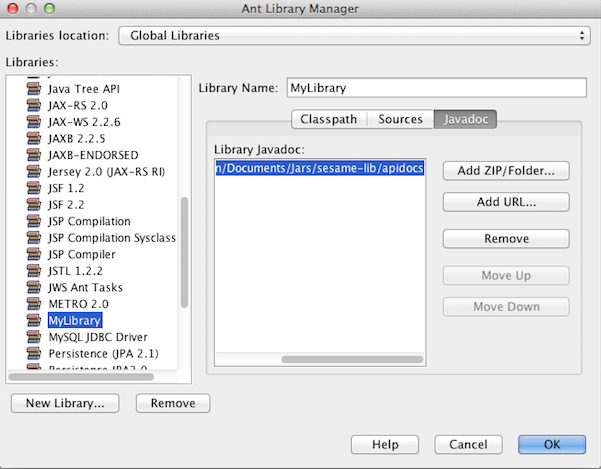
3 steps to add API doc to NetBeans

  • In NetBeans(8.0 in this post), select [Tools] -> [Libraries]


  • [New Library] and add related jars to your library


  • That's it! Now add the created Library to your classpath and check API docs while programming!


Configure Heritrix 1.14.3 in Eclipse

  • Configuration Environment
    • Heritrix 1.14.3
    • Java 1.7
    • Eclipse: LUNA
    • Mac OS (Maverick)

  • Steps for Heritrix open in Eclipse project
  1. Download Hetrix
    • In my case: heritrix-1.14.3-src.tar.gz 
  2. Unzip to your local directory
    • In my case: /Applications/heritrix-1.14.3
  3. Create New Java Project in Eclipse 
    • Project path: /Users/guangyuan/Documents/workspace/Hetrixproject
    • Delete src & bin folders under the Hetrixproject
  4. Copy org,com,st 3 folders from /Applications/heritrix-1.14.3/src/java/ to Hetrixproject folder
  5. Copy modules, profiles, selftest 3 folders with heritrix.properties, jmxremote.password.template, heritrix.cacerts, jndi.properties 4 files from /Applications/heritrix-1.14.3/src/conf to Hetrixproject
  6. Copy  arcMetaheaderBody.xsl and README.txt 2 files from /Applications/heritrix-1.14.3/src/resources to Hetrixproject
  7. Copy webapps folder from /Applications/heritrix-1.14.3/src/ to Hetrixproject
  8. Copy lib folder from /Applications/heritrix-1.14.3/src/ to Hetrixproject
  9. Modify .classpath file in Hetrixproject
<?xml version="1.0" encoding="UTF-8"?>  
 <classpath>  
     <classpathentry kind="src" path=""/>  
     <classpathentry kind="con" path="org.eclipse.jdt.launching.JRE_CONTAINER"/>  
     <classpathentry kind="lib" path="lib/ant-1.6.2.jar"/>  
     <classpathentry kind="lib" path="lib/bsh-2.0b4.jar"/>  
     <classpathentry kind="lib" path="lib/commons-cli-1.0.jar"/>  
     <classpathentry kind="lib" path="lib/commons-codec-1.3.jar"/>  
     <classpathentry kind="lib" path="lib/commons-collections-3.1.jar"/>  
     <classpathentry kind="lib" path="lib/commons-httpclient-3.1.jar"/>  
     <classpathentry kind="lib" path="lib/commons-io-1.3.1.jar"/>  
     <classpathentry kind="lib" path="lib/commons-lang-2.3.jar"/>  
     <classpathentry kind="lib" path="lib/commons-logging-1.0.4.jar"/>  
     <classpathentry kind="lib" path="lib/commons-net-1.4.1.jar"/>  
     <classpathentry kind="lib" path="lib/commons-pool-1.3.jar"/>  
     <classpathentry kind="lib" path="lib/dnsjava-2.0.3.jar"/>  
     <classpathentry kind="lib" path="lib/fastutil-5.0.3-heritrix-subset-1.0.jar"/>  
     <classpathentry kind="lib" path="lib/itext-1.2.0.jar"/>  
     <classpathentry kind="lib" path="lib/jasper-compiler-tomcat-4.1.30.jar"/>  
     <classpathentry kind="lib" path="lib/jasper-runtime-tomcat-4.1.30.jar"/>  
     <classpathentry kind="lib" path="lib/javaswf-CVS-SNAPSHOT-1.jar"/>  
     <classpathentry kind="lib" path="lib/je-3.3.75.jar"/>  
     <classpathentry kind="lib" path="lib/jetty-4.2.23.jar"/>  
     <classpathentry kind="lib" path="lib/jets3t-0.5.0.jar"/>  
     <classpathentry kind="lib" path="lib/junit-3.8.2.jar"/>  
     <classpathentry kind="lib" path="lib/jericho-html-2.6.jar"/>  
     <classpathentry kind="lib" path="lib/libidn-0.5.9.jar"/>  
     <classpathentry kind="lib" path="lib/mg4j-1.0.1.jar"/>  
     <classpathentry kind="lib" path="lib/poi-2.0-RC1-20031102.jar"/>  
     <classpathentry kind="lib" path="lib/poi-scratchpad-2.0-RC1-20031102.jar"/>  
     <classpathentry kind="lib" path="lib/servlet-tomcat-4.1.30.jar"/>  
     <classpathentry kind="output" path=""/>  
 </classpath>  
  1. Modify heritrix.properties in Hetrixproject folder
    • heritrix. version = @ VERSION @ -> heritrix. version = 1.14.3
    • heritrix. cmdline.admin = "your username":"your password" (without quotation marks)
    • heritrix. cmdline.port = 8080 #you could change the default port as well
  2. Refresh Eclipse project and find Heritrix.java under org.archieve.crawler package
  3. [Run as] -> [Java Application]
  4. Heritrix is already started, you could log on with "your username" and "your password" in your browser with http://localhost:8080 now and start crawling!!

Hetrixproject folder structure


  • Other example settings (get URLs only from Hosts)
    • Use Deciding Scope in [Modules]
    • Add 3 decide rules in [SubModules]
      1. org.archive.crawler.deciderules.RejectDecideRule
      2. org.archive.crawler.deciderules.OnHostsDecideRule
      3. org.archive.crawler.deciderules.PrerequisiteAcceptDecideRule
  • About Politeness (in Frontier Settings)
    • delay-factor
      Imposes a delay between URIs from the same host that is a multiple of the amount of time it took to fetch the last URI downloaded from that host.
      For example if it took 800 milliseconds to fetch the last URI from a host and the delay-factor is 5 (a very high value) then the Frontier will wait 4000 milliseconds (4 seconds) before allowing another URI from that host to be processed.
      This value can be set to 0 for maximum impoliteness. It is never possible to have multiple concurrent URIs being processed from the same host.
    • max-delay-ms
    • This setting allows the user to set a maximum upper limit on the 'in between URIs' wait created by the delay factor. If set to 1000 milliseconds then in the example used above the Frontier would only hold URIs from that host for 1 second instead of 4 since the delay factor exceeded this ceiling value.
    • min-delay-ms
    • Similar to the maximum limit, this imposes a minimum limit to the politeness. This can be useful to ensure, for example, that at least 100 milliseconds elapse between connections to the same host. In a case where the delay factor is 2 and it only took 20 milliseconds to get a URI this would come into effect.
    • min-interval-ms
    • An alternate way of putting a floor on the delay, this specifies the minimum number of milliseconds that must elapse from the start of processing one URI until the next one after it starts. This can be useful in cases where sites have a mix of large files that take an excessive amount of time and very small files that take virtually no time.
    • In all cases (this can vary from URI to URI) the more restrictive (delaying) of the two floor values is imposed.
  • About Regular Expression
    • For example, if you want to exclude "jquery" in the URL - .*jquery.* (no \ for escape)
  • Crawl Status Code
  •       1 Successful DNS lookup
          0 Fetch never tried (perhaps protocol unsupported or illegal URI)
         -1 DNS lookup failed
         -2 HTTP connect failed
         -3 HTTP connect broken
         -4 HTTP timeout (before any meaningful response received)
         -5 Unexpected runtime exception; see runtime-errors.log
         -6 Prerequisite domain-lookup failed, precluding fetch attempt
         -7 URI recognized as unsupported or illegal
         -8 Multiple retries all failed, retry limit reached
        -50 Temporary status assigned URIs awaiting preconditions; appearance in
            logs may be a bug
        -60 Failure status assigned URIs which could not be queued by the 
            Frontier (and may in fact be unfetchable)
        -61 Prerequisite robots.txt-fetch failed, precluding a fetch attempt
        -62 Some other prerequisite failed, precluding a fetch attempt
        -63 A prerequisite (of any type) could not be scheduled, precluding a 
            fetch attempt
      -3000 Severe Java 'Error' conditions (OutOfMemoryError, StackOverflowError,
            etc.) during URI processing.
      -4000 'chaff' detection of traps/content of negligible value applied
      -4001 Too many link hops away from seed
      -4002 Too many embed/transitive hops away from last URI in scope
      -5000 Out of scope upon reexamination (only happens if scope changes during 
            crawl)
      -5001 Blocked from fetch by user setting
      -5002 Blocked by a custom processor
      -5003 Blocked due to exceeding an established quota
      -5004 Blocked due to exceeding an established runtime
      -6000 Deleted from Frontier by user
      -7000 Processing thread was killed by the operator (perhaps because of a
            hung condition)
      -9998 Robots.txt rules precluded fetch

Share it if you like the article:)

How To Read File In Java – BufferedReader

JDK 7, read file in Java and automatically close the file.

1:        BufferedReader br = new BufferedReader(new FileReader(file_path));  
2:        String text="";  
3:        String currentLine;  
4:        while ((currentLine = br.readLine())!=null){  
5:          text = text+currentLine;  
6:        }  

How to pass multiple argument for main class in NETBEANS ?

Step 1: Right Click you project and select [Set Configuration] -> [Customize]


Step 2: Set your argument with space (in example below, we set args[0] as temp and args[1] as 1)


Step 3: Simply run your project as you did before.