Showing posts with label exception. Show all posts

I/O exception(java.io.IOException)caught when processing request to{}->tcp://localhost:2376 xxx in Ubuntu

The error occurred when I'm following in28minutes's course - "Microservices" on Udemy. When using maven build command "spring-boot:build-image -DskipTest" to create a Docker image, it gives the error. After digging a while, I found out that the default one is a socket without TCP on Ubuntu.

I had to allow Docker to accept requests from remote hosts by configuring it to listen on an IP address and port as well as the UNIX socket following steps from here.


1.Edit the docker.service file.

sudo systemctl edit docker.service

Lets say we want to listen for connections from any remote host on port 2376

2. we need to add this lines:

[Service]
ExecStart=
ExecStart=/usr/bin/dockerd -H fd:// -H tcp://0.0.0.0:2376

3. Write the changes (ctrl-o) and exit (ctrl-x).
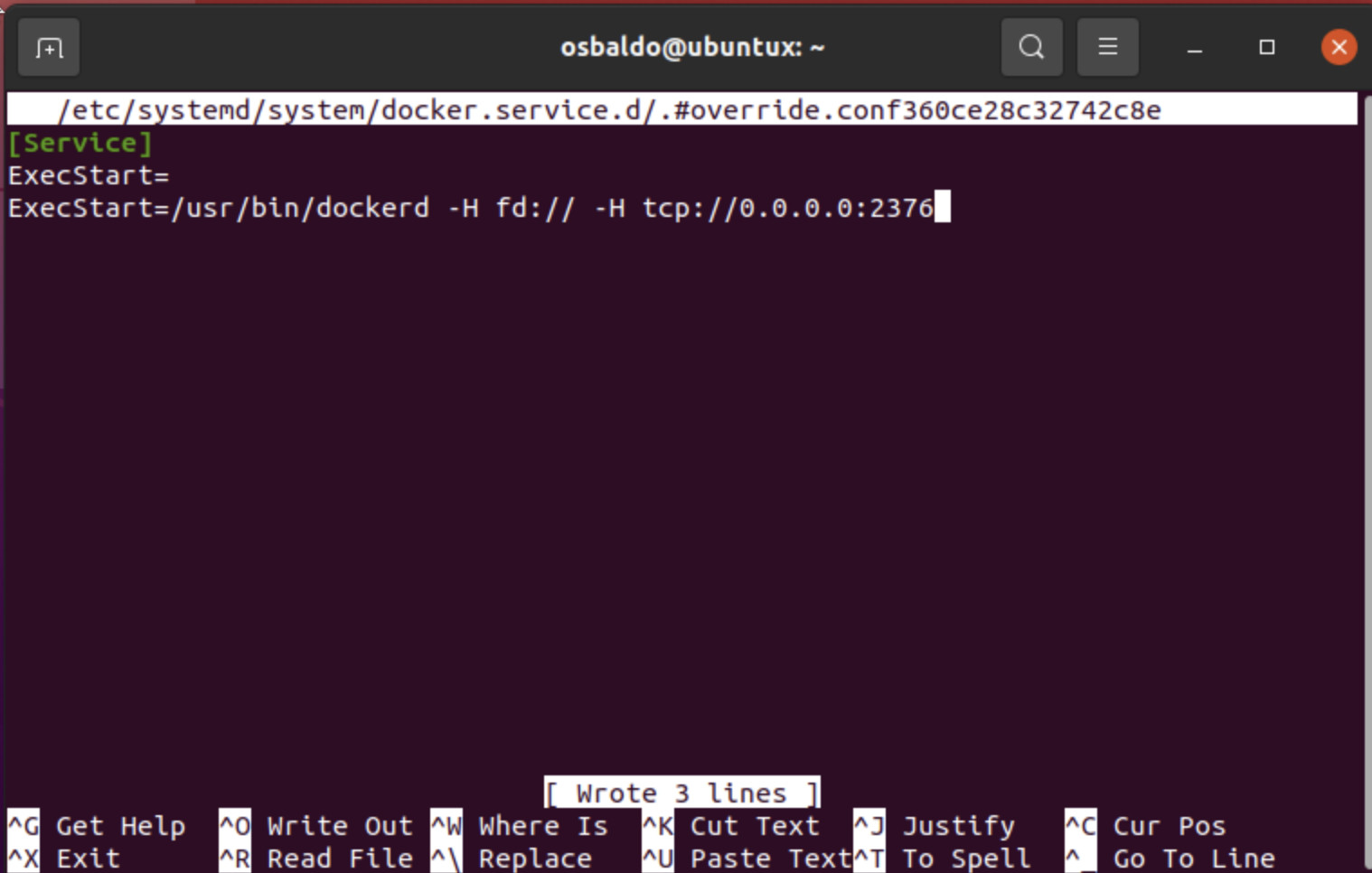
4. Reload the systemctl configuration.

sudo systemctl daemon-reload

5. Restart the Docker service.

sudo systemctl restart docker.service

6. Verify the dockerd daemon listening on the configured port using the netstat command.

sudo netstat -lntp | grep dockerd

here is the sequence:

Also I needed to run the created Docker image with sudo. Another one usefule is creating symlink: sudo ln -s -f /home/[yourusername]/.docker/desktop/docker.sock /var/run/docker.sock

java.sql.SQLException: Incorrect string value:, UTF-8 to utf8mb4 MySQL

Alter DB and Table to utf8mb4

 
ALTER DATABASE CHARACTER SET = utf8mb4 COLLATE = utf8mb4_unicode_ci;  
ALTER TABLE UGCList CONVERT TO CHARACTER SET utf8mb4 COLLATE utf8mb4_unicode_ci;  

Check variables

 
SHOW VARIABLES WHERE Variable_name LIKE 'character\_set\_%' OR Variable_name LIKE 'collation%';  

For MySQL configuration, add two lines for utf8mb4


 [mysqld] 
 character-set-server = utf8mb4  
 collation-server = utf8mb4_unicode_ci  

In your program call SQL, use SET NAMES before update or insert

 String set_names = "SET NAMES 'utf8mb4'";  
 ps = con.prepareStatement(set_names);  
 ps.executeUpdate();  

SET NAMES indicates what character set the client will use to send SQL statements to the server. Thus, SET NAMES 'utf8mb4' tells the server, “future incoming messages from this client are in character set utf8mb4.” It also specifies the character set that the server should use for sending results back to the client.

UTF-8 and utf8mb4
There are known issues storing 4byte utf characters in some versions of MySQL. Apparently you must use utf8mb4 to represent 4 byte UTF characters, as the normal utf8 character set can only represent characters up to 3 bytes in length and so can't store character which are outside of the


Restart MySQL

sudo /etc/init.d/mysql restart

SocketTimeoutException in Jsoup: Read timed out

While using jsoup library to request HTTP connection several times,

                while((line = br.readLine())!=null){  
                     Connection c = Jsoup.connect(line);  
                     c.followRedirects(true);  
                     Response r = c.execute(); 
                }

it will have SocketTimeoutException as below:

java.net.SocketTimeoutException: Read timed out

According to the Javadoc, the default timeout is 3sec, in order to get rid of the exception, you could set the timeout by yourself (A timeout of 0 means infinite)

                while((line = br.readLine())!=null){  
                     Connection c = Jsoup.connect(line);  
                     c.followRedirects(true);  
                     Response r = c.timeout(0).execute();  
             }